Feature
Hebrew. For real.
Your grandparents read Hebrew. Your cousins in Jerusalem read Hebrew. Your religious guests read Hebrew. On Tov, the invitation shows up in proper Hebrew: real Hebrew typefaces, right-to-left reading, the Hebrew date next to the civil date.
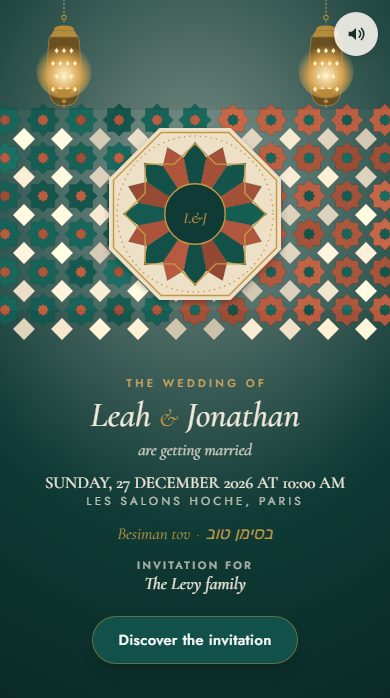
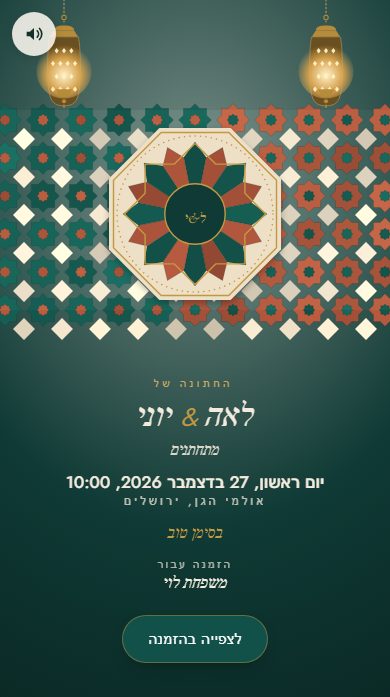
Hebrew done right
Built by and for
the community.
Native Hebrew typefaces
Frank Ruhl Libre (the typeface of Israeli editorial texts) + Heebo (the modern UI typeface). Hosted by us and chosen for on-screen reading.
Full automatic RTL
When a guest opens the invitation in Hebrew, the entire layout mirrors: text right-aligned, buttons to the left of the text, reversed horizontal scroll. No hacks — it's native at the DOM level.
Calculated Hebrew date
You type “June 14, 2026” in the Gregorian calendar. The invitation also shows “29 Sivan 5786” for guests who think in the Hebrew calendar. Calculated automatically via @hebcal/core (the open-source reference).
In practice
What Tov does
for Hebrew.
What you don’t have to do
- Pick a typeface that handles Hebrew letters
- Flip the layout by hand for Hebrew
- Convert the civil date into the Hebrew date
- Rebuild the invitation for each language
What Tov does
- Native Hebrew typefaces (Frank Ruhl Libre + Heebo)
- RTL layout — text on the right, buttons on the left, the way it should be
- Hebrew date calculated automatically (e.g. “29 Sivan 5786”)
- Four languages, chosen household by household: French, English, Hebrew, Spanish
The numbers
2
Native Hebrew typefaces
Frank Ruhl Libre + Heebo
5786
Hebrew year calculated
from the Gregorian date
100%
Full RTL
not a CSS hack
Hebrew questions
Your questions,
our answers.
Does Hebrew show up for every guest, or only some?
The invitation language is set household by household: you pick French, English, Hebrew or Spanish for each household; without a setting, it uses the event's language. Tov does not guess the browser language: you know what each family speaks.
Do I have to translate it myself, or does Tov do it?
The invitation’s labels (buttons, replies, dates) exist in all 4 languages. Your personal text (names, venue, message) appears exactly as you write it: Tov does not translate it. A writing aid is in the works, but it is not available yet.
What about vocalized Hebrew (with nikud)?
There is no nikud setting for now: your text appears as you typed it, and the verses Tov offers are in Hebrew without vowel points.
What about Yiddish?
Yiddish is written in the Hebrew alphabet: you can type it by hand into any field. There is no automatic translation into Yiddish yet.
Mazal tov
Launch your
multilingual invitation.
Hebrew, French, English, Spanish — free during the beta.